使用hexo
付心武士 Lv3

尝试hexo+gitee/github搭建博客

Hexo官网

基础命令

1
2
3
4
5
6
7
8
9
10
11
npm install hexo-cli -g
npm info hexo
hexo init blog
cd blog

hexo clean # 清除所有记录
hexo generate # 生成静态网页
#hexo server -p 80 # 启动服务, -p 80 表示端口号为 80,默认不加端口号是 4000

npm install
hexo server

使用keep主题

相关命令

1
2
3
cd hexo-site
npm install hexo-theme-keep
npm update hexo-theme-keep

安装插件:hexo-image-link

1
npm install hexo-image-link --save

安装插件: hexo-deployer-git

1
npm install --save hexo-deployer-git

修改配置文件:-config.yml

1
2
3
4
5
6
7
8
9
10
11
12
13
14
15
16
17
18
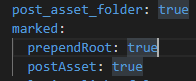
post_asset_folder: true
marked:
prependRoot: true
postAsset: true

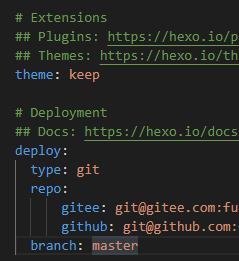
# Extensions
## Plugins: https://hexo.io/plugins/
## Themes: https://hexo.io/themes/
theme: keep

# Deployment
## Docs: https://hexo.io/docs/one-command-deployment
deploy:
type: git
repo:
gitee: git@gitee.com:***/***.git #仓库的地址
github: git@github.com:***/***.github.io.git
branch: master

Gitee 帮助中心

知乎参考

注意:不用使用中午文件名,图片名不能有空格。